
Integration Guide
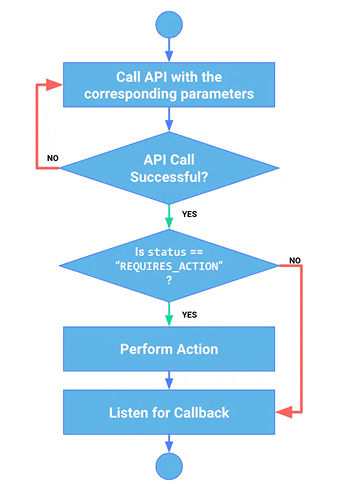
Integrating the payment API involves three main steps:
-
Calling the API Endpoint: Follow the endpoints specified in the API reference.
Example of Endpoint Invocation for 'create payment_intents':
To make a payment using the Lexupay API, you need to call the 'POST /api/v1/payment_intents' endpoint with the required data in the payload. Here is an example of how to create a payment_intents:
**Example API Request: **
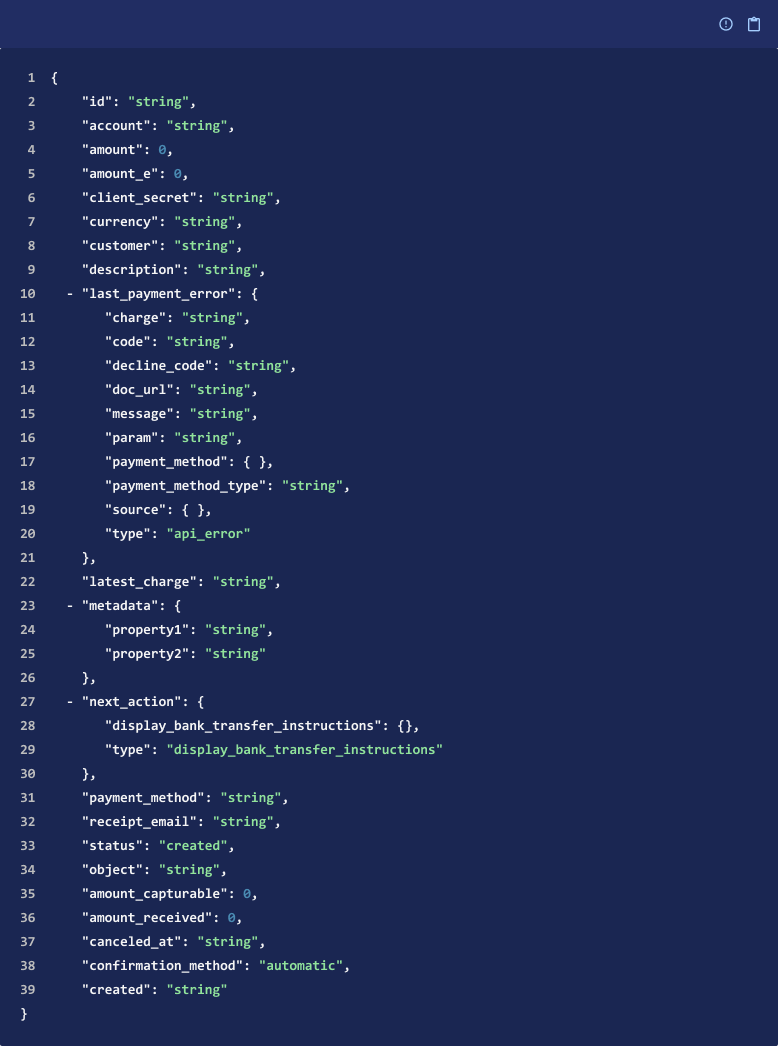
Explanation:
-
'amount'(required) number
Amount intended to be collected by this PaymentIntent. A positive integer representing how much to charge in the smallest currency unit (e.g., 100 cents to charge $1.00 or 100 to charge ¥100, a zero-decimal currency). The minimum amount is $0.50 US or equivalent in charge currency. The amount value supports up to eight digits (e.g., a value of 99999999 for a USD charge of $999,999.99).
-
'amount_e' number
Decimal places in amount.
-
'currency'(required) string
Only return transactions in a certain currency. Three-letter ISO currency code, in lowercase. Must be a supported currency.
-
'metadata' dictionary[string, string]
Set of key-value pairs that you can attach to an object. This can be useful for storing additional information about the object in a structured format. If 'metadata.ref' is provided, it must be a unique string (as 'metadata.ref' is treated as a client-generated identifier).
-
'description' string or null
An arbitrary string attached to the object. Often useful for displaying to users. '**<= 5000 characters**'
-
'receipt_email' string
Email address that the receipt for the resulting payment will be sent to. If '**receipt_email**' is specified for a payment in live mode, a receipt will be sent regardless of your email settings. **'<= 5000 characters'**
-
'confirmation_method' string
Describes whether we can confirm this PaymentIntent automatically, or if it requires customer action to confirm the payment.
Allowed values: 'automatic''manual' -
'payment_method_data' payment_method_data_params
If provided, this hash will be used to create a PaymentMethod. The new PaymentMethod will appear in the payment_method property on the PaymentIntent.
After the PaymentIntent is created, attach a payment method and confirm to continue the payment. You can read more about the different payment flows available via the Payment Intents API.
When you use ‘confirm=true’ during creation, it’s equivalent to creating and confirming the PaymentIntent in the same call. You can use any parameters available in the confirm API when you supply ‘confirm=true’.
- Customer Action Before Payment Success: If the status is ‘requires_action’, a link will be provided for the next step.
- Listening to Webhook/Callback: Lexupay will asynchronously send HTTPS requests to your web application after certain events occur.
To set up the webhook/callback URL, visit the Lexupay dashboard, then click Profile > Developers > Webhook Tab.
Updated about 1 year ago